## How to Create and Organize Email Filters in Gmail
Here's your practical win for today. I'll walk you through setting up a Gmail filter for the First AI Movers newsletter—and you can adapt this for any other subscription or email.
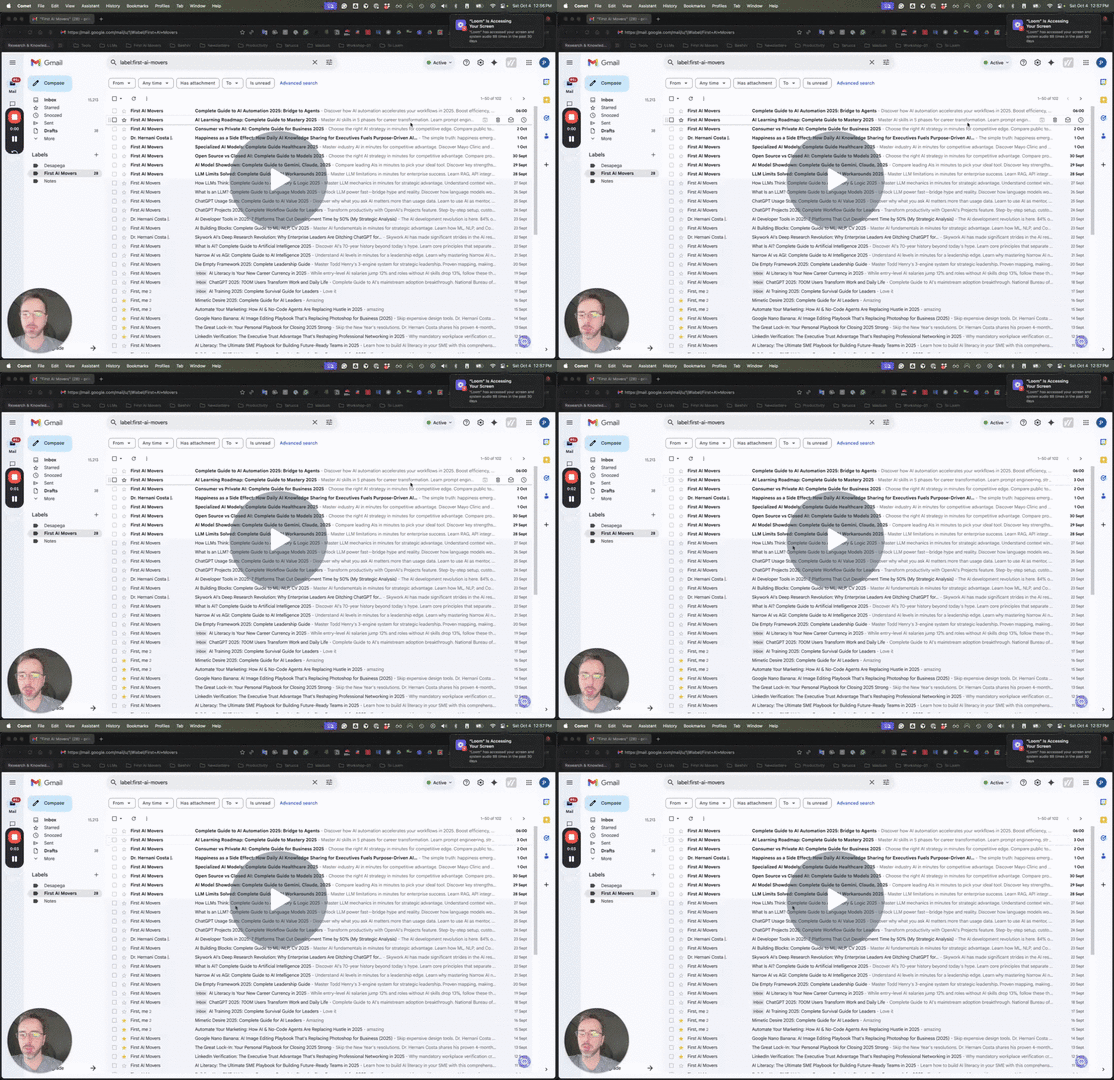 Link to Loom: https://loom.com/share/d209d3b165d64d348de207095cd2a9c3
**Step 1: Access Your Email** [0:00](https://loom.com/share/d209d3b165d64d348de207095cd2a9c3?t=0&utm_source=www.firstaimovers.com&utm_medium=newsletter&utm_campaign=60-second-gmail-pro-auto-organize-your-inbox-2025-guide)
Link to Loom: https://loom.com/share/d209d3b165d64d348de207095cd2a9c3
**Step 1: Access Your Email** [0:00](https://loom.com/share/d209d3b165d64d348de207095cd2a9c3?t=0&utm_source=www.firstaimovers.com&utm_medium=newsletter&utm_campaign=60-second-gmail-pro-auto-organize-your-inbox-2025-guide)
 * Open your Gmail account.
* Locate the email address you want to filter.
**Step 2: Create a Filter** [0:23](https://loom.com/share/d209d3b165d64d348de207095cd2a9c3?t=23&utm_source=www.firstaimovers.com&utm_medium=newsletter&utm_campaign=60-second-gmail-pro-auto-organize-your-inbox-2025-guide)
* Open your Gmail account.
* Locate the email address you want to filter.
**Step 2: Create a Filter** [0:23](https://loom.com/share/d209d3b165d64d348de207095cd2a9c3?t=23&utm_source=www.firstaimovers.com&utm_medium=newsletter&utm_campaign=60-second-gmail-pro-auto-organize-your-inbox-2025-guide)
 * Click on the email address.
* In the search bar, type 'from:' followed by the email address, e.g., **newsletter@firstaimovers.com**.
* Click on 'Create filter'.
**Step 3: Choose Filter Actions** [0:37](https://loom.com/share/d209d3b165d64d348de207095cd2a9c3?t=37&utm_source=www.firstaimovers.com&utm_medium=newsletter&utm_campaign=60-second-gmail-pro-auto-organize-your-inbox-2025-guide)
* Click on the email address.
* In the search bar, type 'from:' followed by the email address, e.g., **newsletter@firstaimovers.com**.
* Click on 'Create filter'.
**Step 3: Choose Filter Actions** [0:37](https://loom.com/share/d209d3b165d64d348de207095cd2a9c3?t=37&utm_source=www.firstaimovers.com&utm_medium=newsletter&utm_campaign=60-second-gmail-pro-auto-organize-your-inbox-2025-guide)
 * Decide what you want to do with the filtered emails:
* Skip the inbox (archive it).
* Apply a specific label (e.g., 'Newsletter').
* Create subfolders for better organization.
**Step 4: Additional Filter Options** [0:57](https://loom.com/share/d209d3b165d64d348de207095cd2a9c3?t=57&utm_source=www.firstaimovers.com&utm_medium=newsletter&utm_campaign=60-second-gmail-pro-auto-organize-your-inbox-2025-guide)
* Decide what you want to do with the filtered emails:
* Skip the inbox (archive it).
* Apply a specific label (e.g., 'Newsletter').
* Create subfolders for better organization.
**Step 4: Additional Filter Options** [0:57](https://loom.com/share/d209d3b165d64d348de207095cd2a9c3?t=57&utm_source=www.firstaimovers.com&utm_medium=newsletter&utm_campaign=60-second-gmail-pro-auto-organize-your-inbox-2025-guide)
 * You can also:
* Automatically archive emails.
* Forward emails to another address (for advanced users).
* Ensure emails never go to spam.
**Step 5: Mark as Important** [1:07](https://loom.com/share/d209d3b165d64d348de207095cd2a9c3?t=67&utm_source=www.firstaimovers.com&utm_medium=newsletter&utm_campaign=60-second-gmail-pro-auto-organize-your-inbox-2025-guide)
* You can also:
* Automatically archive emails.
* Forward emails to another address (for advanced users).
* Ensure emails never go to spam.
**Step 5: Mark as Important** [1:07](https://loom.com/share/d209d3b165d64d348de207095cd2a9c3?t=67&utm_source=www.firstaimovers.com&utm_medium=newsletter&utm_campaign=60-second-gmail-pro-auto-organize-your-inbox-2025-guide)
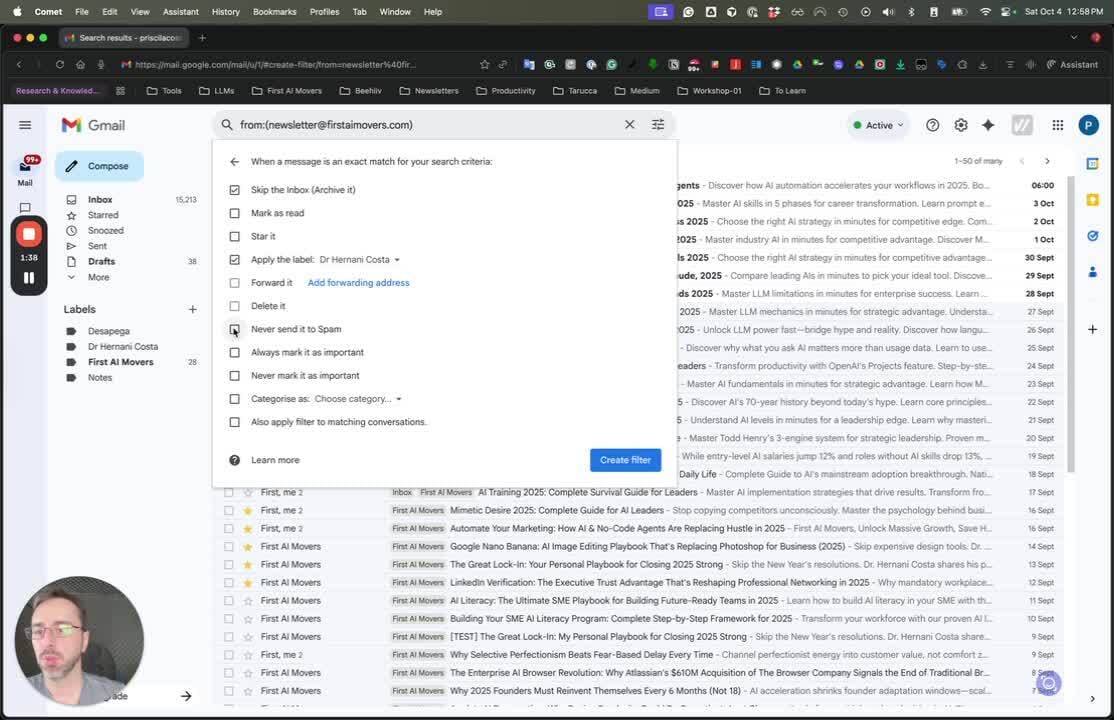 * Always mark important emails to ensure they are delivered to your inbox.
**Step 6: Use Categories** [1:17](https://loom.com/share/d209d3b165d64d348de207095cd2a9c3?t=77&utm_source=www.firstaimovers.com&utm_medium=newsletter&utm_campaign=60-second-gmail-pro-auto-organize-your-inbox-2025-guide)
* Always mark important emails to ensure they are delivered to your inbox.
**Step 6: Use Categories** [1:17](https://loom.com/share/d209d3b165d64d348de207095cd2a9c3?t=77&utm_source=www.firstaimovers.com&utm_medium=newsletter&utm_campaign=60-second-gmail-pro-auto-organize-your-inbox-2025-guide)
 * If you prefer not to use labels or folders, consider using Gmail's categories.
**Step 7: Apply Filter to Existing Emails** [1:40](https://loom.com/share/d209d3b165d64d348de207095cd2a9c3?t=100&utm_source=www.firstaimovers.com&utm_medium=newsletter&utm_campaign=60-second-gmail-pro-auto-organize-your-inbox-2025-guide)
* If you prefer not to use labels or folders, consider using Gmail's categories.
**Step 7: Apply Filter to Existing Emails** [1:40](https://loom.com/share/d209d3b165d64d348de207095cd2a9c3?t=100&utm_source=www.firstaimovers.com&utm_medium=newsletter&utm_campaign=60-second-gmail-pro-auto-organize-your-inbox-2025-guide)
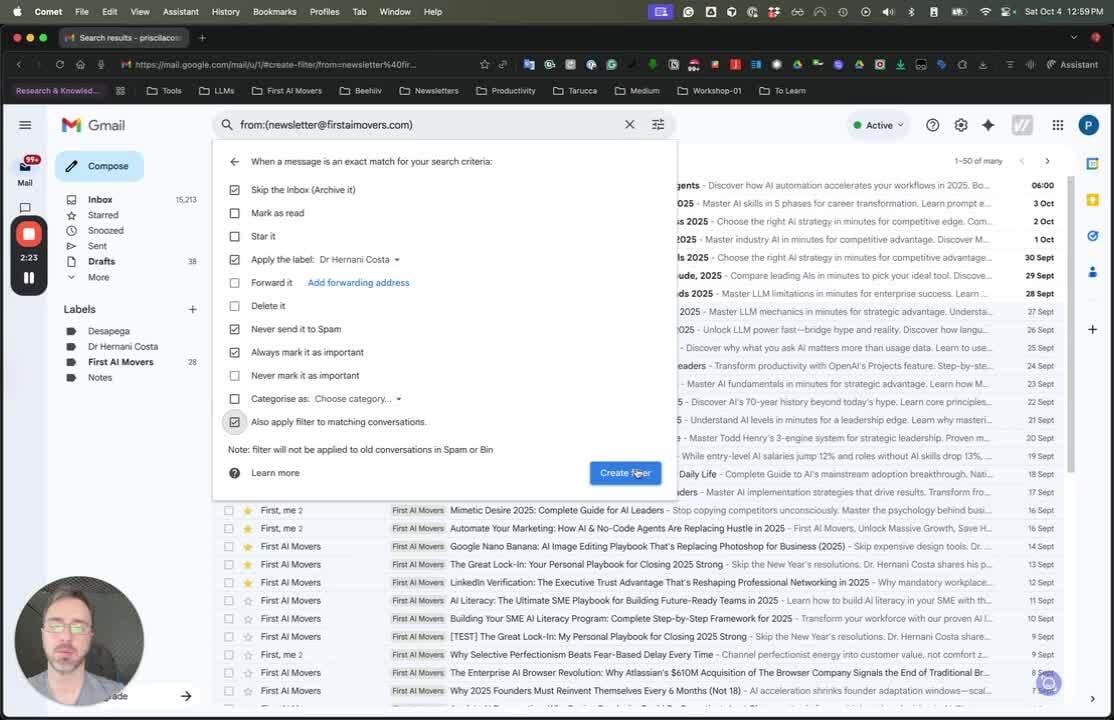 * The filter will also categorize and classify all past emails that match the criteria.
**Step 8: Review and Finalize** [1:40](https://loom.com/share/d209d3b165d64d348de207095cd2a9c3?t=100&utm_source=www.firstaimovers.com&utm_medium=newsletter&utm_campaign=60-second-gmail-pro-auto-organize-your-inbox-2025-guide)
* The filter will also categorize and classify all past emails that match the criteria.
**Step 8: Review and Finalize** [1:40](https://loom.com/share/d209d3b165d64d348de207095cd2a9c3?t=100&utm_source=www.firstaimovers.com&utm_medium=newsletter&utm_campaign=60-second-gmail-pro-auto-organize-your-inbox-2025-guide)
 * Review your filter settings and finalize to organize your email effectively.
* * *
Looking for more great writing in your inbox? 👉 [Discover the newsletters busy professionals love to read.](https://recommendations.page/first-ai-movers?email={{email}}&utm_source=www.firstaimovers.com&utm_medium=newsletter&utm_campaign=60-second-gmail-pro-auto-organize-your-inbox-2025-guide)
_Hi, my name is_ _[Dr. Hernani Costa](https://www.firstaimovers.com/c/connect?utm_source=www.firstaimovers.com&utm_medium=newsletter&utm_campaign=60-second-gmail-pro-auto-organize-your-inbox-2025-guide)__, Founder of_ _[First AI Movers](https://www.linkedin.com/company/first-ai-movers/?utm_source=www.firstaimovers.com&utm_medium=newsletter&utm_campaign=60-second-gmail-pro-auto-organize-your-inbox-2025-guide)__. For inquiries and partnerships, contact me at_ _[info at firstaimovers dot com](info@firstaimovers.com)__; or message me on_ _[LinkedIn](https://www.linkedin.com/in/hernani-costa-ai-ceo-firstaimovers?utm_source=www.firstaimovers.com&utm_medium=newsletter&utm_campaign=60-second-gmail-pro-auto-organize-your-inbox-2025-guide)__._
* * *
* Review your filter settings and finalize to organize your email effectively.
* * *
Looking for more great writing in your inbox? 👉 [Discover the newsletters busy professionals love to read.](https://recommendations.page/first-ai-movers?email={{email}}&utm_source=www.firstaimovers.com&utm_medium=newsletter&utm_campaign=60-second-gmail-pro-auto-organize-your-inbox-2025-guide)
_Hi, my name is_ _[Dr. Hernani Costa](https://www.firstaimovers.com/c/connect?utm_source=www.firstaimovers.com&utm_medium=newsletter&utm_campaign=60-second-gmail-pro-auto-organize-your-inbox-2025-guide)__, Founder of_ _[First AI Movers](https://www.linkedin.com/company/first-ai-movers/?utm_source=www.firstaimovers.com&utm_medium=newsletter&utm_campaign=60-second-gmail-pro-auto-organize-your-inbox-2025-guide)__. For inquiries and partnerships, contact me at_ _[info at firstaimovers dot com](info@firstaimovers.com)__; or message me on_ _[LinkedIn](https://www.linkedin.com/in/hernani-costa-ai-ceo-firstaimovers?utm_source=www.firstaimovers.com&utm_medium=newsletter&utm_campaign=60-second-gmail-pro-auto-organize-your-inbox-2025-guide)__._
* * *
Author: Dr. Hernani Costa — Founder of First AI Movers and Core Ventures. AI Architect, Strategic Advisor, and Fractional CTO helping Top Worldwide Innovation Companies navigate AI Innovations. PhD in Computational Linguistics, 25+ years in technology.
Originally published at First AI Movers under CC BY 4.0.